OAuth 2.0 Guide
OAuth 2.0 is an authentication system which allows 3rd-party apps to access Awair data on behalf of Awair users. A user with an Awair account can send an Authorization Grant to the third-party app by logging in through the Awair page. This Authorization Grant can be exchanged for an API token. When used in a call to the Awair Developer API, this token allows the app to make requests as if it were the user.
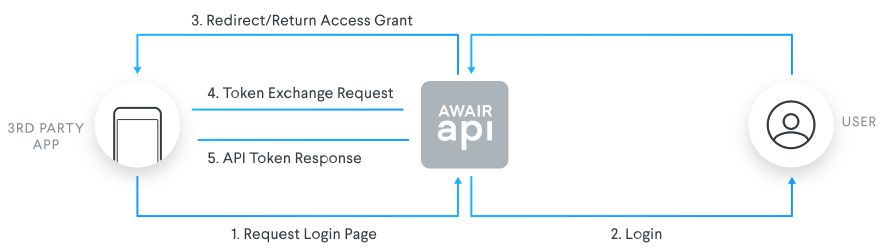
Access Request
Apps request access from users by directing the user to the Awair login page by calling:
GET https://oauth-login.awair.isThe list of query parameters is detailed in the API list at the bottom of the page, but note that response_type must always be set to
"code".The user will see a login page, where they input their awair credentials. If the user inputs the wrong credentials, they will remain on the login page.
Upon entry of recognized credentials, the browser environment is redirected to the specified redirect_uri, with the following query parameters:
GET {{redirect_uri}}?code={{code}}&state={{state}}The code parameter is the Authorization Grant from the user, while state is application-specific.
Token Exchange
Token exchange is done in 2 parts. The first call should exchange the Authorization Grant from step 3 to a Refresh Token and a short-lived API Token, while all subsequent calls should use the Refresh Token to renew the API Token.
In either case, the same endpoint is called:
POST https://oauth2.awair.is/v2/tokenThe request must include the client_id and client_secret of the same Client that was submitted as a query parameter in step 1.
Authorization Grant
To exchange an Authorization Grant, the endpoint should be called with grant_type set to
"authorization_code", and code set to the value from step 3.The response body will include the
access_tokenfield, which is a short-lived API Token. It also includes the fieldrefresh_token, which should be permanently stored for future use.Refresh Token
Once an API Token expires, any calls to the Awair Developer API will have a response with status code 422 with the body containing JSON:
 {
   "message": "jwt expired"
 }
When this occurs, a new token exchange must be performed. In this case, the grant_type parameter should be set to
"refresh_token"and the refresh_token parameter should be set to the Refresh Token that was obtained in the previous section.The response will be the same as in the previous section, but without the
refresh_tokenfield.
The response will include the API token. This token can be used to make requests to the Awair Developer API in the name of the user.
OAuth 2.0 Flow API List
GET https://oauth-login.awair.is
Request Parameters
| Name | Type | Required Value | Required | Description |
|---|---|---|---|---|
| state | string | yes | Can be used to hold application specific information, e.g. user ID. | |
| scope | string | yes | ||
| response_type | string | "code" | yes | |
| client_id | string | yes | Taken from Create OAuth 2.0 Client page. | |
| redirect_uri | string | yes | The browser will be redirected to this page once login is complete. |
Response
The indirect response is a GET request sent to the specified redirect_uri (see step 3 above).
POST https://oauth2.awair.is/v2/token
Request Parameters
The following parameters should be submitted as JSON in the request body.
| Name | Type | Required Value | Required | Description |
|---|---|---|---|---|
| client_id | string | yes | Taken from Create OAuth 2.0 Client page. | |
| client_secret | string | yes | Taken from Create OAuth 2.0 Client page. | |
| grant_type | string | "authorization_code" OR "refresh_token" | yes | |
| code | string | yes | The code returned as a query parameters (See step 3). |
Response
The following will be returned as JSON in the response body.
| Name | Type | Required Value | Required | Description |
|---|---|---|---|---|
| token_type | string | "Bearer" | yes | Marks access_token as a Bearer Token. |
| access_token | string | yes | Api Access Token. |